
Mercedes-Benz infotainment and vehicle control systems have evolved significantly over the years. Before the introduction of the current Mercedes-Benz User Experience, most models by the German manufacturer came equipped with the Mercedes-Benz COMAND, or Cockpit Management and Data system.
Mastering Mercedes-Benz COMAND: Ultimate User Guide
Mastering Mercedes-Benz COMAND: An Owner's Guide to Features, Navigation, and Everyday Use
Mercedes-Benz infotainment has changed a lot over the years. Before MBUX became the brand's primary interface, many Mercedes-Benz models used COMAND, short for Cockpit Management and Data. If you are shopping older luxury vehicles, especially pre-owned Mercedes-Benz models from the late 1990s through many 2018 model-year vehicles, there is a good chance COMAND will be part of the experience.
That is why it still matters. A well-kept Mercedes-Benz with COMAND can feel modern where it counts, especially if you want built-in navigation, Bluetooth, steering-wheel controls, and the upscale cabin design Mercedes-Benz is known for. If you are browsing our pre-owned inventory or comparing options in our certified pre-owned Mercedes-Benz inventory, understanding how COMAND works can help you choose the right vehicle with more confidence.
What Mercedes-Benz COMAND Actually Does
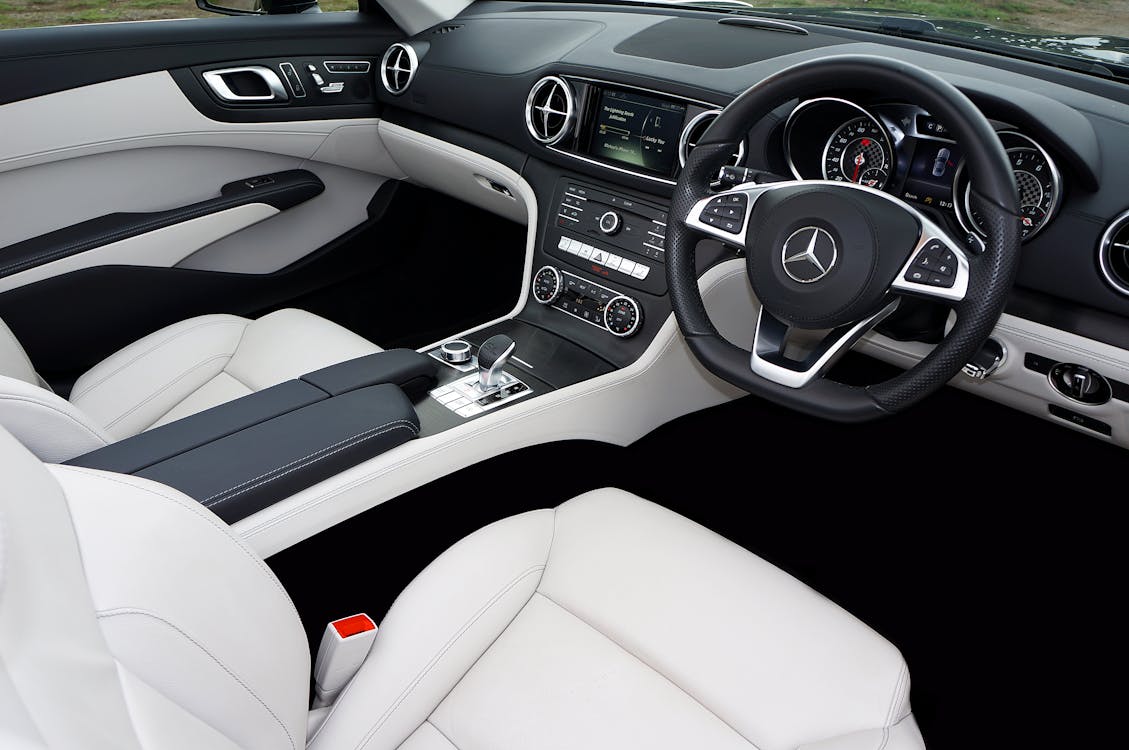
Black and White Interior of a Mercedes-Benz by Mike Bird is licensed with Pexels License
COMAND was developed to bring core vehicle and multimedia controls into one central system. Depending on the model and year, that can include navigation, radio, media playback, phone pairing, vehicle settings, and access to certain connected services. Earlier versions are simpler and more button-driven. Later versions feel more polished, with larger displays, better graphics, touchpad inputs, and broader smartphone support on equipped models.
You will commonly find COMAND in pre-owned Mercedes-Benz vehicles such as the C-Class, E-Class, S-Class, GLC, GLE, GLS, CLA, and GLA. The exact version varies by model year and trim, so two vehicles that look similar on the outside can offer very different screen layouts and menus inside.
Key Features of the Mercedes-Benz COMAND System
Navigation That Is Still Easy To Use
One of COMAND's biggest strengths is factory navigation. In later versions, the system can provide turn-by-turn guidance, route calculations, and traffic-aware routing on equipped vehicles. Around the Hamptons and the East End, that can be genuinely useful when you are heading from Southampton to Riverhead, cutting across Long Island, or planning a busy summer weekend drive.
Using navigation is usually straightforward. Press the NAV button, choose an address or point of interest, and confirm the route. On many versions, voice input is also available, which makes it easier to set a destination without scrolling through menus while parked.
Media, Audio, and In-Car Controls
COMAND is more than a map screen. It also serves as the main hub for radio stations, Bluetooth audio, media libraries, and vehicle settings. Depending on the year and package, you may find hard-drive-based navigation, HD Radio, SiriusXM capability, USB connectivity, and premium audio options. Later COMAND systems also brought sharper displays and more polished menu graphics, which made the whole cabin feel more upscale.
One of the nicest parts of using COMAND in a well-maintained Mercedes-Benz is that it tends to feel intuitive after a short learning curve. Once you get used to the controller, menu wheel, touchpad, or shortcut buttons, moving between maps, media, and phone functions becomes second nature.
Smartphone Integration on Later COMAND Models
Not every COMAND system offers the same phone features, so it is worth checking the exact vehicle you are considering. Many earlier versions focus on Bluetooth calling and audio streaming. Later equipped versions added Apple CarPlay and Android Auto support, which can make a pre-owned Mercedes-Benz feel much more current in daily driving.
If smartphone integration is high on your list, we can help you confirm what a specific vehicle includes before you buy. That is especially helpful when you are comparing model years that sit right around the transition from basic Bluetooth connectivity to more advanced smartphone mirroring.
Advanced COMAND Features You May See on Higher-End Models
Traffic and Weather Information
On certain COMAND Online systems and properly equipped models, navigation can work with live traffic information to help adjust route guidance. Some versions can also display weather details through built-in services. These features can vary by model year, equipment, and subscription status, but on the right vehicle they add another layer of convenience.
Vehicle Settings and Status Menus
COMAND can also give you access to a range of vehicle information and settings, such as audio preferences, lighting options, clock settings, and service reminders. In some Mercedes-Benz vehicles, drivers also use the system alongside the instrument cluster menus to check maintenance prompts and key vehicle data. It is one of the reasons older Mercedes-Benz cabins still feel thoughtfully designed. The tech was built to keep everyday controls in one place instead of scattering them across the dash.
What COMAND Means for Used-Car Shopping
If you are shopping pre-owned, COMAND is not just a convenience feature. It can tell you a lot about the age and feel of the vehicle. Earlier versions have a more traditional luxury layout with physical buttons and simpler graphics. Later versions, especially in high-trim E-Class and S-Class models, feel much closer to the digital interface drivers expect today. If you want help narrowing down the right fit, our team can walk you through available vehicles and explain how the system differs from one model to the next. You can also contact us with a specific VIN or vehicle listing and we can help verify the equipment.
Troubleshooting and Maintaining the COMAND System
Common Problems Owners Run Into
Most COMAND issues are not dramatic. They are usually the kinds of things owners notice over time, such as slow startup, a frozen screen, trouble pairing a phone, missing navigation data, or Bluetooth that drops unexpectedly. On older vehicles, wear in the control knob, touchpad, or related hardware can also affect usability.
If you are looking at a used Mercedes-Benz, it is smart to test every part of the system before buying. Pair your phone, check the map screen, switch between media sources, and make sure the controller responds the way it should. Small issues are easier to address when you spot them early.
Software, Maps, and Updates
With COMAND, update availability depends heavily on model year and system version. Some vehicles may still be eligible for map or software updates, while others are more limited. That is one reason it helps to work with a Mercedes-Benz service team that knows the brand's older systems. If your navigation data is outdated or the system behaves inconsistently, our service center can help determine what is possible for your specific vehicle.
When To Bring It In
If the screen keeps freezing, the audio cuts out, buttons stop responding, or phone connectivity never stays stable, it is time for a proper inspection. Electronic issues can start small and get more frustrating over time. You can schedule service online, review current service and parts specials, and, if needed, work with our parts center for genuine Mercedes-Benz components that fit and function the way they should.
Still a Smart System for the Right Driver
COMAND may not be the newest Mercedes-Benz interface, but that does not make it outdated for every driver. In the right vehicle, it still delivers the features many people use most: navigation, phone connectivity, media controls, and vehicle settings in one clean layout. That is a big reason so many pre-owned Mercedes-Benz models still feel satisfying to live with.
If you are comparing older Mercedes-Benz vehicles and want a luxury cabin with useful everyday tech, COMAND deserves a close look. And if you are figuring out the numbers at the same time, our finance center and trade-in appraisal tools can make the shopping process a lot easier.
Frequently Asked Questions About Mercedes-Benz COMAND
What does COMAND stand for in a Mercedes-Benz?
COMAND stands for Cockpit Management and Data. It is the infotainment and vehicle-control system Mercedes-Benz used on many models before MBUX became the brand's newer multimedia interface.
Does Mercedes-Benz COMAND have Apple CarPlay or Android Auto?
Some later COMAND systems on equipped vehicles do, but not all of them. Earlier versions may only offer Bluetooth calling and audio streaming, so it is important to confirm the features on the exact vehicle you are considering.
Can the COMAND navigation system still be updated?
In some cases, yes. Update availability depends on the model year and the specific COMAND version in the vehicle. A Mercedes-Benz service department can confirm whether map or software updates are still available.
Is COMAND still worth having in a used Mercedes-Benz?
For many drivers, yes. If the system is working properly, COMAND still gives you useful features like built-in navigation, media controls, Bluetooth functionality, and easy access to vehicle settings in a premium cabin layout.
What should I check when buying a used Mercedes-Benz with COMAND?
Test the screen, controller, navigation, Bluetooth pairing, audio sources, and any smartphone integration features. It is also smart to ask whether the vehicle has had any infotainment repairs or software updates.
Categories:
Mercedes-Benz Features & Technology
 AdChoices